
YouTube ads for beginners can feel intimidating because they combine two platforms: YouTube for the video and Google Ads for targeting and billing. This blueprint simplifies it into eight steps, from setup to your first sales, using the same process we use when launching YouTube campaigns for clients at Savoir Management.
Step 1: How do you set up YouTube advertising?
YouTube ads are created in Google Ads, not in YouTube Studio. You need a Google Ads account, a YouTube channel with your ad video uploaded (public or unlisted), the channel linked to Google Ads, and conversion tracking on your website.
Create or sign in to Google Ads.
Upload your ad to your YouTube channel. Unlisted is fine.
Link the channel to Google Ads so you can remarket to viewers.
Install conversion tracking for purchases or leads.
Step 2: Which YouTube campaign type should beginners choose?
Choose a Video campaign with a sales or leads goal, or a Demand Gen campaign, when you want conversions. Use awareness or reach goals only when brand recall is the objective.
Google explains the options in its overview of Video campaigns and Demand Gen campaigns. Demand Gen runs across YouTube, Shorts, Discover, Gmail and more, and is built for action-oriented advertisers.
Step 3: What is the winning formula for a beginner's YouTube ad?
The winning formula is hook, value, offer. Stop the scroll in the first five seconds, show why your product solves the problem in the middle, and end with a clear, irresistible reason to act now.
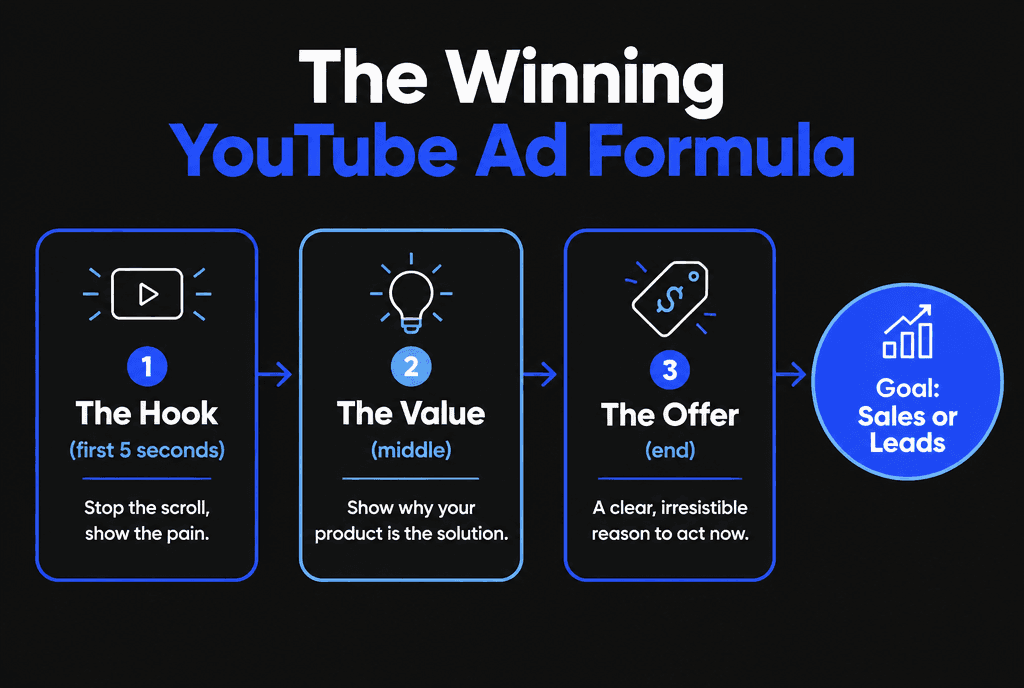
Hook: show the pain or the desired result immediately.
Value: demonstrate the product, explain the mechanism, show proof.
Offer: a specific action with a reason to do it today.
For more script detail, read how to create YouTube ads that convert.
Step 4: How should beginners target YouTube ads?
Layer audiences instead of picking one. Combine custom segments built from search terms your buyers use, in-market audiences for your category, and your own data segments of site visitors and viewers.
Custom segments: people who searched terms like "best project management software."
In-market audiences: people Google identifies as actively researching a category.
Your data segments: website visitors, video viewers and customer lists, set up through data segments.
Start with two or three ad groups, each built on one audience layer, so you can see which works.

Step 5: What budget should a beginner set?
Start with $20 to $50 a day per campaign for two to four weeks. Put most of the budget on the audience closest to buying, and avoid splitting a small budget across many ad groups.
Step 6: What is the 20/80 rule for YouTube ads?
The 20/80 rule means roughly 20% of your audiences and videos will produce about 80% of results. Find that 20% fast by testing, then move budget to it instead of spreading spend evenly.
Each week:
Rank ad groups and ads by cost per conversion.
Pause the bottom performers.
Shift their budget to the top performers.
Add one new video or audience to test.

Step 7: Which bidding strategy should beginners use?
Begin with Maximize Conversions or the campaign's default conversion bidding, then switch to Target CPA once you have steady conversion volume. Automated bidding needs conversion data to work.
Read Google's guide to Target CPA bidding. Do not change bids, budgets and audiences all at once, because each change resets the learning period.
Step 8: How do you measure YouTube ad success?
Measure cost per conversion, conversion rate and return on ad spend first, then view rate and click-through rate to diagnose creative. Views alone do not pay the bills.
Use video ad formats that fit each goal, and review results weekly. When one audience and one video consistently hit your target, build out a full YouTube ads funnel.

What should you prepare before your first YouTube campaign?
Prepare a clear offer, one or two finished video ads, a fast landing page that matches the ad, conversion tracking and a budget you can sustain for at least a few weeks.
A pre-launch checklist for beginners:
Offer: a specific next step, such as a free consultation, a starter product or a guide
Videos: at least two versions with different openings so you can compare them
Landing page: fast on mobile, with the same promise as the ad; see our guide to high-converting landing pages
Tracking: conversions set up in Google Ads, as described in about conversion measurement
Audiences: website visitors and video viewers saved as data segments for later remarketing
Budget: an amount you can run consistently long enough to learn
Launching without tracking is the most common beginner mistake, because it leaves you guessing which ads make money.
How do you read your first week of results?
In week one, look for signals rather than verdicts: are people watching past the opening, clicking through and taking any action on the landing page? Use those signals to fix the weakest step.
Early numbers are small, so avoid overreacting to daily swings. Instead, read the funnel in order:
View rate and watch time: if most viewers skip immediately, change the opening
Click-through rate: if people watch but rarely click, strengthen the call to action
Landing page conversion rate: if people click but do not convert, fix the page or offer
Cost per conversion: once conversions accumulate, compare it with what a customer is worth
Write down what you change and when, so you can connect changes to results.
When should a beginner increase the budget?
Increase budget once you have steady conversions at a cost you can afford, and raise it gradually so automated bidding can adjust. Do not scale a campaign that has not yet proved it can produce customers profitably.
A careful approach is to raise budgets in modest steps, wait several days to see whether cost per conversion holds, then repeat. If costs rise sharply, pause increases, refresh creative or narrow back to the best audiences. Scaling also works through new ads and audiences, not only bigger budgets.
How do remarketing campaigns help beginners?
Remarketing shows ads to people who already watched your videos or visited your site. These warm audiences usually convert at a lower cost, making remarketing one of the most efficient places for a beginner to spend.
Build audiences from people who watched a meaningful portion of your ads or visited key pages, then show them a follow-up video with proof and a clear offer. Exclude people who have already converted. Our YouTube ads funnel strategy explains how awareness, consideration and conversion campaigns work together.
What does a simple 30-day plan look like?
Week one launches and checks tracking, week two fixes the weakest step, week three tests a new opening or offer, and week four decides whether to scale, refine or rethink the approach.
Days 1 to 7: launch two ads, confirm conversions record correctly, watch view and click rates
Days 8 to 14: improve the landing page or call to action based on early signals
Days 15 to 21: test a new opening against the current best ad; start a small remarketing campaign
Days 22 to 30: compare cost per conversion with your target and decide the next step
Thirty days of disciplined testing teaches more than months of random changes.
How do you choose who sees your first ads?
Start with audiences closest to buying: people searching or browsing topics related to your offer, your website visitors and lists of existing contacts. Broaden only after you know which messages work.
Beginners often target very broad audiences hoping to reach as many people as possible, which spreads a small budget too thin. Begin with focused segments that signal intent, such as people interested in your product category or who recently searched related terms, plus remarketing to your own visitors. Exclude existing customers when your goal is new sales. As results come in, test one new audience at a time against your best performer, so you know exactly what each addition contributes.
What mistakes do beginners make with YouTube ads?
Beginners often optimize for views instead of conversions, skip conversion tracking, use long intros before the hook, target audiences that are too broad and judge results after a few days.
No conversion tracking, so Google cannot optimize for sales
Logo animations or long intros before the hook
One huge audience instead of layered tests
Sending clicks to the homepage instead of a matching landing page
Changing settings daily
Want a done-for-you launch? Our digital marketing team builds and manages YouTube campaigns, and our landing page development team builds the pages they send traffic to. You can also compare YouTube with TikTok ads for short-form video.


