A Meta ads retargeting strategy focuses spend on the people most likely to buy: those who already know you. Most visitors leave without converting, and Baymard Institute's research puts the average documented online cart abandonment rate at 70.22%. Retargeting on Facebook and Instagram is how you bring a share of them back. This is the step-by-step approach we use at Savoir Management.
What is Meta ads retargeting, and why does it work?
Meta retargeting shows ads to people who already interacted with your brand: website visitors, video viewers, Instagram engagers or past customers. It works because these people know you, so a reminder, an answer to an objection or a reason to act now often closes the sale.
Retargeting is not spamming people who did not buy. Done well, it reminds them why they almost did. Meta builds these groups through custom audiences from your website, app, engagement and customer lists.

Step 1: How do you set up tracking for Meta retargeting?
Install the Meta Pixel on every page, send standard events (ViewContent, AddToCart, InitiateCheckout, Purchase), and add the Conversions API so events also arrive from your server. Without clean events, your audiences and reporting fall apart.
The Meta Pixel tracks actions people take on your website.
The Conversions API sends the same events server-side, which improves matching and measurement.
Use event deduplication so the same purchase is not counted twice.
Step 2: How should you build retargeting audiences?
Segment audiences by intent and recency, not just "all visitors." Someone who abandoned a cart yesterday needs a different ad than someone who read a blog post three weeks ago.
A practical audience map:
Hot: added to cart or started checkout in the last 7 days
Warm: viewed product or pricing pages in the last 14 days
Engaged: watched 50% or more of a video, or engaged with your Instagram, in the last 30 days
Past buyers: purchased in the last 180 days, for cross-sell and repeat offers
Exclude each smaller, hotter audience from the broader ones so people only see the most relevant ad.

Step 3: What message should each audience see?
Match the ad to the hesitation. Cart abandoners usually need reassurance or urgency, product viewers need proof, and engaged non-visitors need a clear reason to click. Past buyers need something new.
Cart abandoners: shipping and returns policy, limited-time incentive, reviews of the exact product.
Product viewers: best sellers, comparisons, user-generated content.
Engagers: a short demo or founder story with a soft offer.
Past buyers: complementary products, refills, loyalty rewards.
Step 4: Which ad formats work best for retargeting?
Dynamic product ads from your catalog, short testimonial videos, carousels of viewed products and Stories or Reels ads work best. Dynamic ads automatically show people the items they viewed.
Keep ads familiar: same brand colors and product images people saw on your site, so the ad feels like a continuation of their visit rather than a new message.

Step 5: How do you control frequency and fatigue?
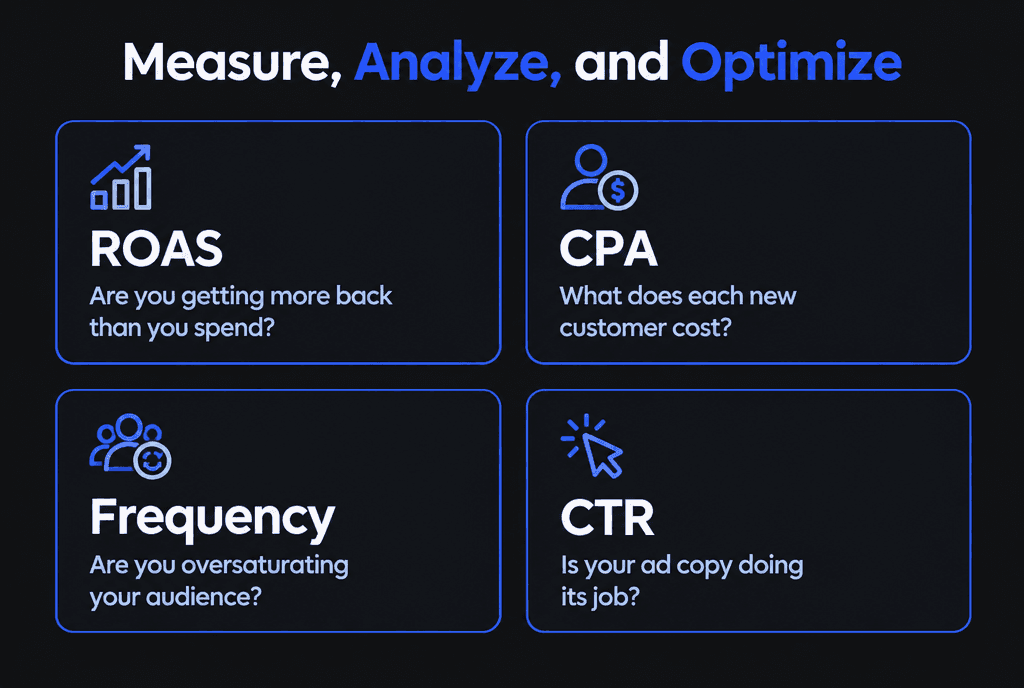
Watch frequency alongside click-through rate and cost per result. When frequency climbs while CTR falls, refresh creative, shorten the audience window or lower the budget. Seeing the same ad too often annoys people who were close to buying.
Rotate at least two or three creatives per audience and replace the weakest every couple of weeks. Meta's ad auction also factors in ad quality and estimated action rates, so fatigued ads cost more to deliver.
Step 6: How do you measure retargeting results?
Judge retargeting by return on ad spend, cost per acquisition, frequency and click-through rate, and test it against a holdout where possible. Retargeting can take credit for sales that would have happened anyway.
Use Meta's A/B testing tool to compare offers or creatives on the same audience. Confirm revenue in your store or analytics, not only in Ads Manager.
How do you scale retargeting without wasting money?
Retargeting is limited by the size of your warm audiences. To scale it, grow the top of the funnel with prospecting campaigns and look-alike audiences, then let retargeting convert the extra visitors.
Build look-alike audiences from purchasers to find new prospects similar to your buyers. Our Meta Ads e-commerce guide covers prospecting and campaign structure.
How long should retargeting windows be?
Match the window to your buying cycle. Short windows suit quick purchases and abandoned carts; longer windows suit high-value products and services that people research for weeks. Use several windows with different messages rather than one long list.
A practical structure layers audiences by recency and intent:
Very recent, high intent: people who added to cart, started checkout or began a form in the last few days
Recent browsers: people who viewed products or service pages in the last few weeks
Longer-term engagers: people who visited, watched videos or engaged with your page over a longer period
Recent, high-intent audiences usually justify a direct offer and higher spend per person. Older audiences respond better to reminders, proof and new reasons to come back, such as new products, seasonal offers or customer stories. Meta's custom audiences support these website, engagement and customer list sources.
How do privacy changes affect retargeting?
Browser restrictions and opt-outs mean the Pixel alone captures fewer events. Combining the Pixel with the Conversions API, building first-party lists and using engagement audiences keeps retargeting effective.
The Conversions API sends events from your server, which makes measurement more reliable when browser-based tracking is blocked. Encourage visitors to join your email list or create accounts, so you can reach them with permission through customer lists. Engagement audiences, such as people who watched your videos or interacted with your Instagram profile, do not depend on website tracking at all. Always follow your privacy policy and applicable laws when uploading customer data.
How should service businesses retarget leads?
Service businesses should retarget people who viewed service or pricing pages, started but did not finish a form, or watched explainer videos, with proof, answers to objections and an easy way to book.
Retargeting for services is less about discounts and more about trust. Effective messages include short client testimonials, before-and-after results, a clear explanation of the process, a guarantee or an invitation to a free consultation. Send clicks to a focused landing page or booking page rather than the homepage. Our guide to why your website might be losing bookings covers the booking side.
How should e-commerce stores use dynamic retargeting?
Dynamic ads automatically show shoppers the products they viewed or added to cart, pulled from your product catalog. They are one of the most efficient retargeting tools for stores with many products.
Dynamic retargeting depends on an accurate product catalog and correctly configured Meta Pixel events, especially ViewContent, AddToCart and Purchase with matching product IDs. Keep product images, prices and availability up to date, and exclude recent purchasers or show them complementary products instead. Our guide to Meta ads for e-commerce explains how retargeting fits into a full-funnel store strategy.
How much budget should retargeting get?
Retargeting audiences are smaller than prospecting audiences, so they need less budget, but they often produce the best return. Size the budget to audience size and frequency, and increase prospecting when retargeting lists shrink.
If retargeting frequency climbs high while results fall, the audience is saturated and extra budget is wasted. If the lists are large and converting well, a modest increase may pay off. Remember that retargeting depends on prospecting: without new visitors, retargeting audiences shrink and costs rise.
How do you write retargeting ads that feel helpful, not creepy?
Remind people of what they were interested in without implying you watched every click. Lead with value, answer the question that probably stopped them and give a clear, low-pressure next step.
People abandon carts and forms for ordinary reasons: they got distracted, wanted to compare prices, were unsure about shipping or needed approval from someone else. Good retargeting addresses those reasons directly. Highlight free returns or delivery times for shoppers, share a short testimonial or guarantee for service leads, and answer common objections in a carousel or short video. Rotate messages over the retargeting window so people see something new each time, and cap how often the same person sees ads so the brand stays welcome rather than intrusive.
What retargeting mistakes should you avoid?
Avoid one giant "all visitors" audience, showing purchasers the product they just bought, discounting too early, ignoring frequency and judging results without a holdout or analytics check.
The website matters too. If checkout is slow or confusing, retargeting only brings people back to the same problem. Our guide to e-commerce websites that increase sales covers the fixes. Retargeting is about relationships, not ads, and our Facebook ads team can build the program for you. You can apply the same ideas on TikTok.